
Microsoft Bubble: The Ultimate Guide to Gameplay, Powerful Features, and Winning Strategies
Discover how Microsoft Bubble combines colorful puzzles, strategic bubble shooting, exciting challenges, and rewarding gameplay for casual puzzle lovers.

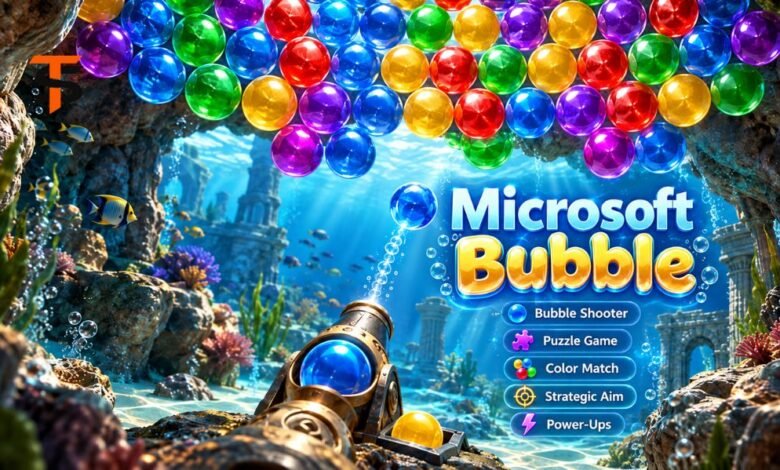
Microsoft Bubble is a colorful puzzle game that transforms the familiar bubble-shooting experience into an entertaining test of accuracy, patience, and strategy. Developed around simple matching mechanics, the game challenges players to eliminate groups of bubbles while managing limited moves and increasingly difficult obstacles. Its bright, underwater-inspired visuals, useful power-ups, and progressive challenges appeal to both beginners and experienced puzzle enthusiasts. Available through Microsoft’s gaming platforms, it offers accessible entertainment without complicated controls. Understanding its mechanics can help players improve their scores, complete difficult levels, and enjoy a more rewarding experience.
What Is Microsoft Bubble?
Microsoft Bubble is a bubble-shooter puzzle game published by Xbox Game Studios. Players launch colorful bubbles at groups of matching colors, aiming to clear the board and complete specific objectives.
The basic concept resembles traditional arcade bubble games, but additional challenges and strategic features make the experience more engaging.
Microsoft also offers a browser-based version through MSN Games. Microsoft released a PC edition on 23 March 2026, with Xbox achievement support and extra benefits for eligible Game Pass subscribers.
Unlike fast-paced action games, it focuses on careful decisions, accurate aiming, and efficient use of available resources.
How to Play Microsoft Bubble
The controls are straightforward, but later levels require more than random bubble shooting.
Understanding the Basic Rules
Players aim a bubble launcher toward groups of coloured bubbles. Connecting three or more bubbles of the same color causes the matching group to disappear.
The primary objective is to clear bubbles while satisfying the level’s requirements.
A successful shot may also disconnect bubbles from the remaining structure, causing them to fall and potentially increasing the player’s score.
Making Every Shot Count
In levels with limited moves, careless shots can make victory considerably harder.
Before launching a bubble, examine the color arrangement and look for opportunities to remove larger sections.
Using the Bubble Launcher Effectively
The MSN version describes a launcher that lets players switch between multiple available bubbles, with up to five reserve slots.
This flexibility makes planning especially valuable. Choosing a different color may create a better opportunity than firing the current Bubble immediately.
Features That Make the Game Entertaining
Microsoft Bubble builds on familiar matching mechanics with features designed to keep players engaged.
Unlimited Levels and Increasing Difficulty
The game advertises unlimited levels, letting players keep progressing through increasingly demanding challenges.
Later stages introduce more complicated arrangements, different objectives, and obstacles that require careful planning.
This progression encourages players to develop new strategies rather than rely entirely on techniques learned during the opening levels.
Power-Ups and Special Obstacles
Power-ups provide additional ways to handle difficult situations.
Some special abilities can help remove bubbles or overcome obstacles that would otherwise require several carefully positioned shots.
However, using an ability immediately isn’t always the smartest move. Saving a useful power-up for a particularly difficult arrangement may produce better results.
Xbox Achievements and Rewards
The PC version supports Xbox achievements, giving players objectives beyond completing ordinary levels.
Achievement-based challenges can encourage experimentation with different techniques, including efficient clearing and high-scoring gameplay.
Eligible Xbox Game Pass subscribers also receive Microsoft-advertised benefits, including ad-free play and extra moves.
These extras can make longer gaming sessions more convenient.
Where Can You Play Microsoft Bubble?
Players can access the game in different ways, depending on their preferred platform.
Playing Online
The browser-based edition is available through Microsoft’s MSN Games platform.
It features an underwater grotto setting and familiar color-matching gameplay. This option is especially convenient for users who prefer to play online without installing a separate PC game.
Playing on Windows PC
Microsoft lists the newer version as a free PC game through its Xbox and Microsoft Store ecosystem.
The listed capabilities include Xbox achievements, while supported Game Pass subscriptions offer additional benefits.
Although the game appears within Xbox services, its official store listing identifies PC as the supported installation platform rather than confirming a native Xbox console edition.
Smart Strategies for Clearing Difficult Levels
Improving at Microsoft Bubble requires understanding how bubble positions affect the entire board.
Focus on the Upper Sections
Whenever possible, target bubbles that support large groups beneath them.
Removing an important connection can cause several additional bubbles to fall without requiring individual shots.
This approach can save moves and create more scoring opportunities.
Use Wall Bounces Carefully
Direct shots aren’t always available, especially when matching colors sit behind other clusters.
Angled shots that bounce off the walls can help players reach otherwise difficult positions.
Practicing these shots improves accuracy, but players should consider where the Bubble will likely land before firing.
Avoid Blocking Useful Colors
A poorly placed bubble may obstruct access to an important matching group.
Instead of targeting the nearest available match, consider how the board will look after the shot.
Planning two or three moves is often more effective than focusing only on immediate results.
Save Special Abilities for Critical Moments
Power-ups are especially valuable when obstacles limit access to key bubbles or when only a few moves remain.
Use ordinary shots to clear simple combinations and save special abilities for tougher situations.
Why Microsoft Bubble Appeals to Casual Gamers
One of the game’s strongest qualities is its accessibility.
New players can understand the matching rules quickly, while experienced players can focus on improving accuracy, reducing wasted moves, and reaching higher scores.
The colorful presentation makes the experience visually engaging without requiring complicated instructions.
Short puzzle sessions also make it suitable for breaks, while unlimited levels allow extended play.
Its combination of familiar rules and increasing difficulty provides a satisfying balance between relaxation and mental engagement.
Common Gameplay Problems and Practical Solutions
Occasionally, players may experience loading problems, missing progress, or difficulty accessing a particular version.
If the PC game won’t open, restart the application, check for Microsoft Store updates, and verify your internet connection.
Players should also distinguish between the browser and PC editions. Progress synchronization between different versions should not be assumed.
Before resetting an application or deleting game data, check whether progress is tied to the account and whether you can recover it.
Frequently Asked Questions
1. Is Microsoft Bubble free to play?
Yes. Microsoft lists the PC edition as free, and a browser-based version is available through MSN Games. Eligible Game Pass subscribers also get additional benefits, including ad-free gameplay and extra moves.
2. How do you win levels in Microsoft Bubble?
Players complete levels by matching groups of at least three bubbles of the same color and meeting the required objectives. Aiming efficiently, choosing colors strategically, and using power-ups carefully can significantly improve performance.
3. Can I play Microsoft Bubble without downloading it?
Yes. The MSN Games version is designed for browser play, letting users enjoy the bubble-shooting experience without installing the separate PC edition.
4. Does Microsoft Bubble have unlimited levels?
Microsoft advertises unlimited levels, with evolving missions, increasingly challenging arrangements, and different obstacles. This gives players ongoing opportunities to improve their skills and tackle new puzzles.
5. Why is Microsoft Bubble not loading on my computer?
Loading problems may relate to application errors, outdated software, connectivity issues, or local system settings. Try restarting the game, checking for Windows and Microsoft Store updates, and verifying your connection. Consider repairing the app before trying a reset, which could affect saved data.
Conclusion
Microsoft Bubble offers a satisfying combination of classical bubble-shooter mechanics and modern puzzle features. Its colorful environments, challenging objectives, strategic power-ups, and Xbox achievement support give players several reasons to keep improving.
The game’s greatest appeal lies in its balance of simplicity and thoughtful decision-making. Beginners can enjoy matching colorful bubbles, while experienced players can experiment with advanced techniques and aim for higher scores.
For anyone seeking accessible puzzle entertainment, Microsoft Bubble remains an enjoyable option that rewards accuracy, planning, and patience.